
Read the commission
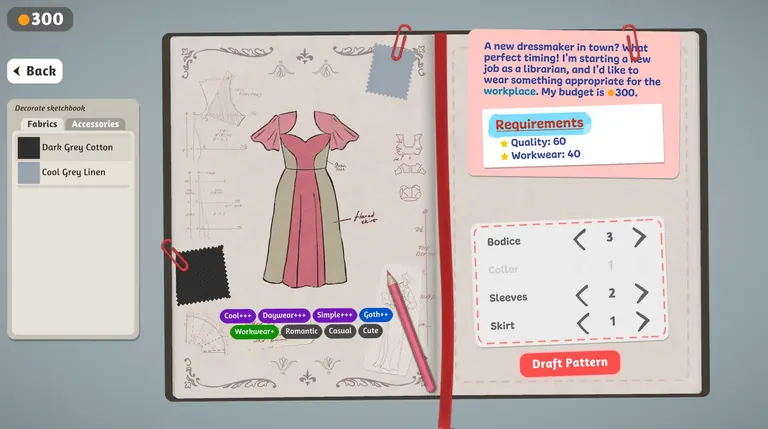
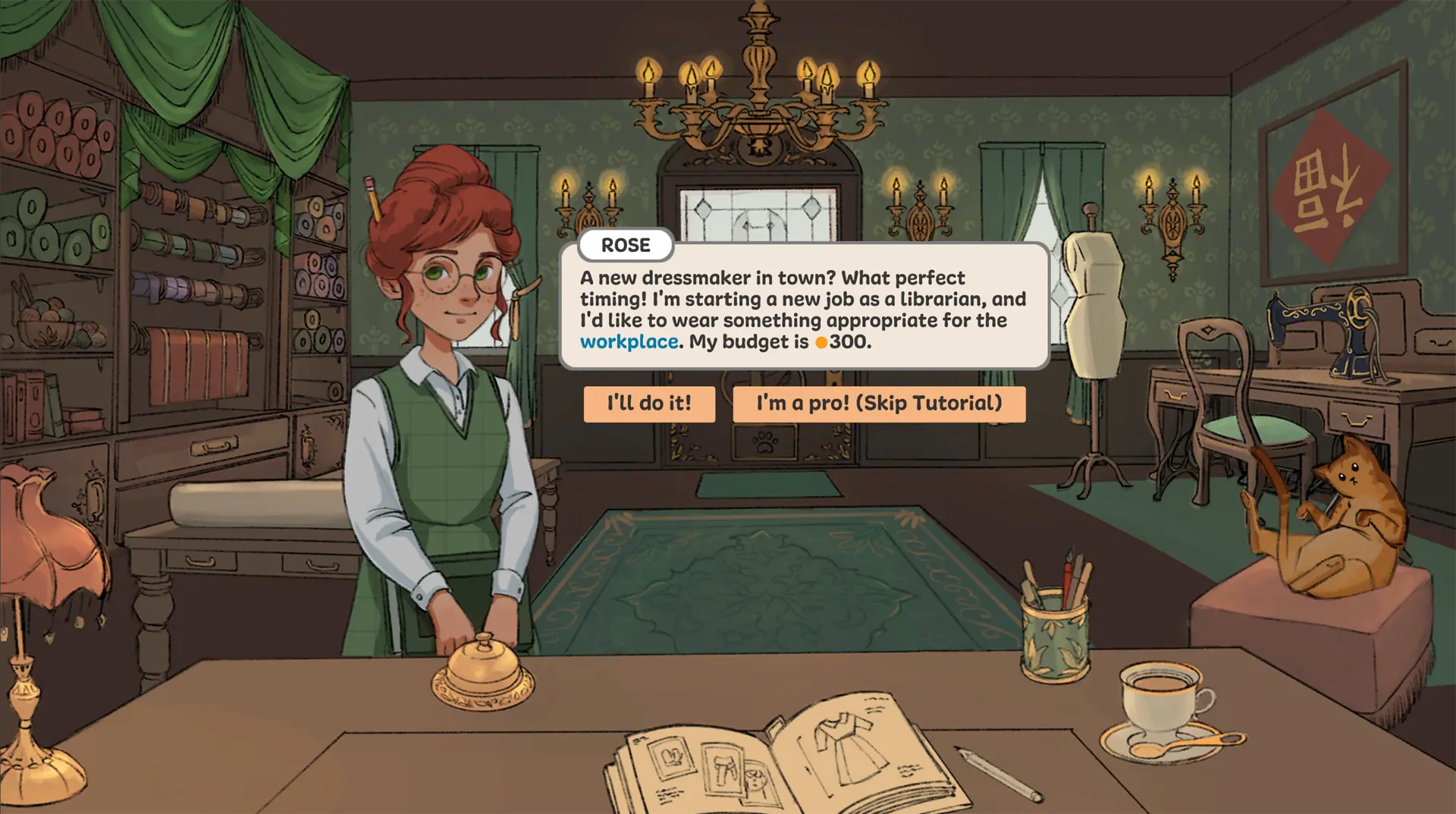
Rose asks for librarian workwear on a 300-coin budget. Note the occasion and the targets before choosing a dress.
See Rose's brief and screenshot →Dressmakerをオンラインでプレイ
インストール不要 · プレイを押してからゲームデータを読み込みます
スマートフォンでは、横向き(横画面)にするとより快適に遊べます。
ゲームが空白のままなら、再読み込みするか 読み込みチェックリスト に従ってください。再読み込みで進行状況がリセットされることがあります。
無料のブラウザ版プロトタイプをプレイ。ローズの依頼を読み、スケッチブックでデザインし、裁断と縫製を進めて完成後の結果を確認しましょう。
 Dressmaker プロトタイプの画像Dressmaker をプレイ ↗
Start with the browser prototype above. These four steps follow what you can see in the game; our beginner guide has real screenshots and more detail.
Rose asks for librarian workwear on a 300-coin budget. Note the occasion and the targets before choosing a dress.
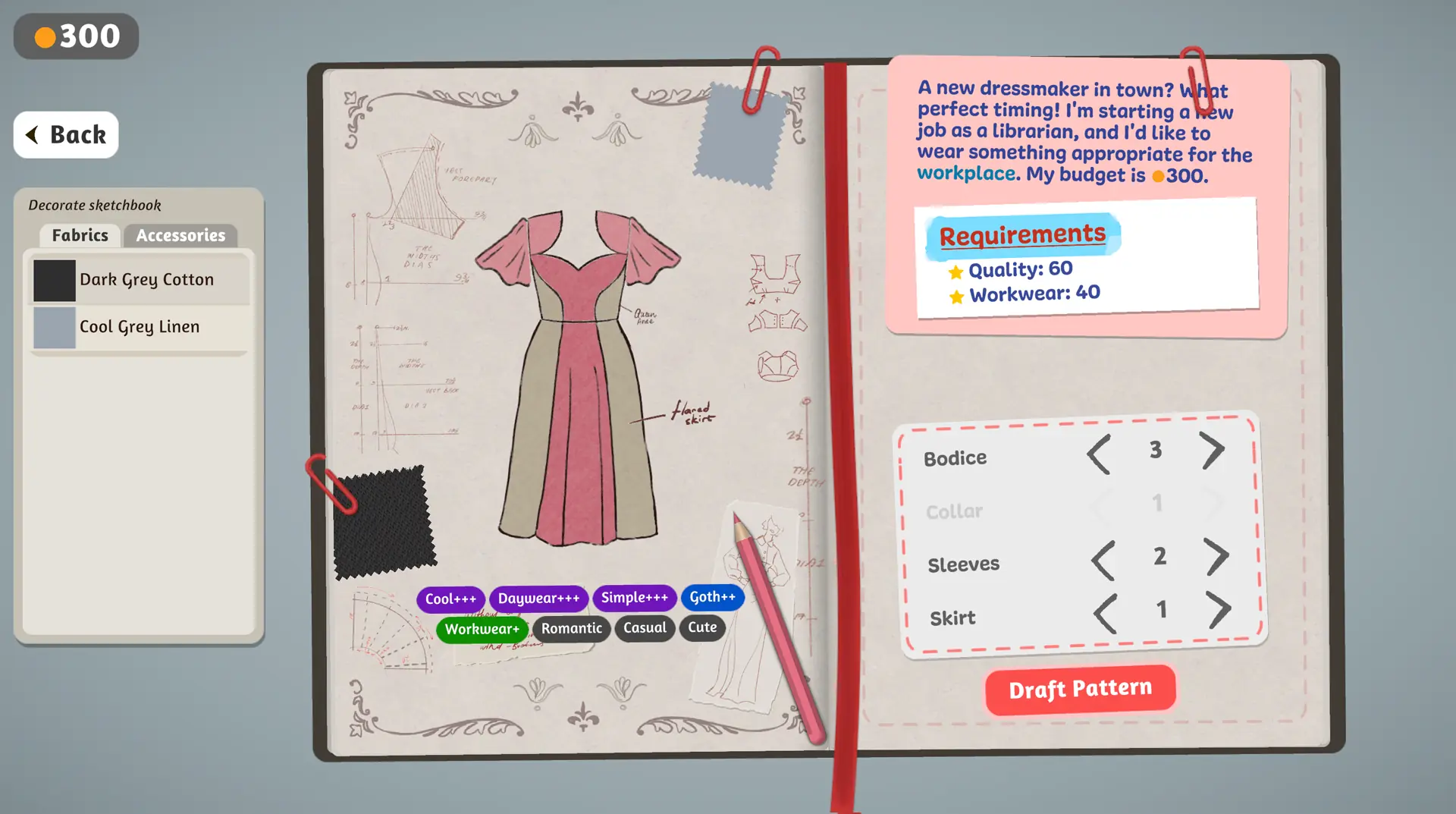
See Rose's brief and screenshot →Change one bodice, sleeve or skirt part at a time. Compare fabrics and the visible style tags before drafting.
Explore the sketchbook controls →When the design is ready, select Draft Pattern. Follow the game's prompts for fabric placement and sewing.
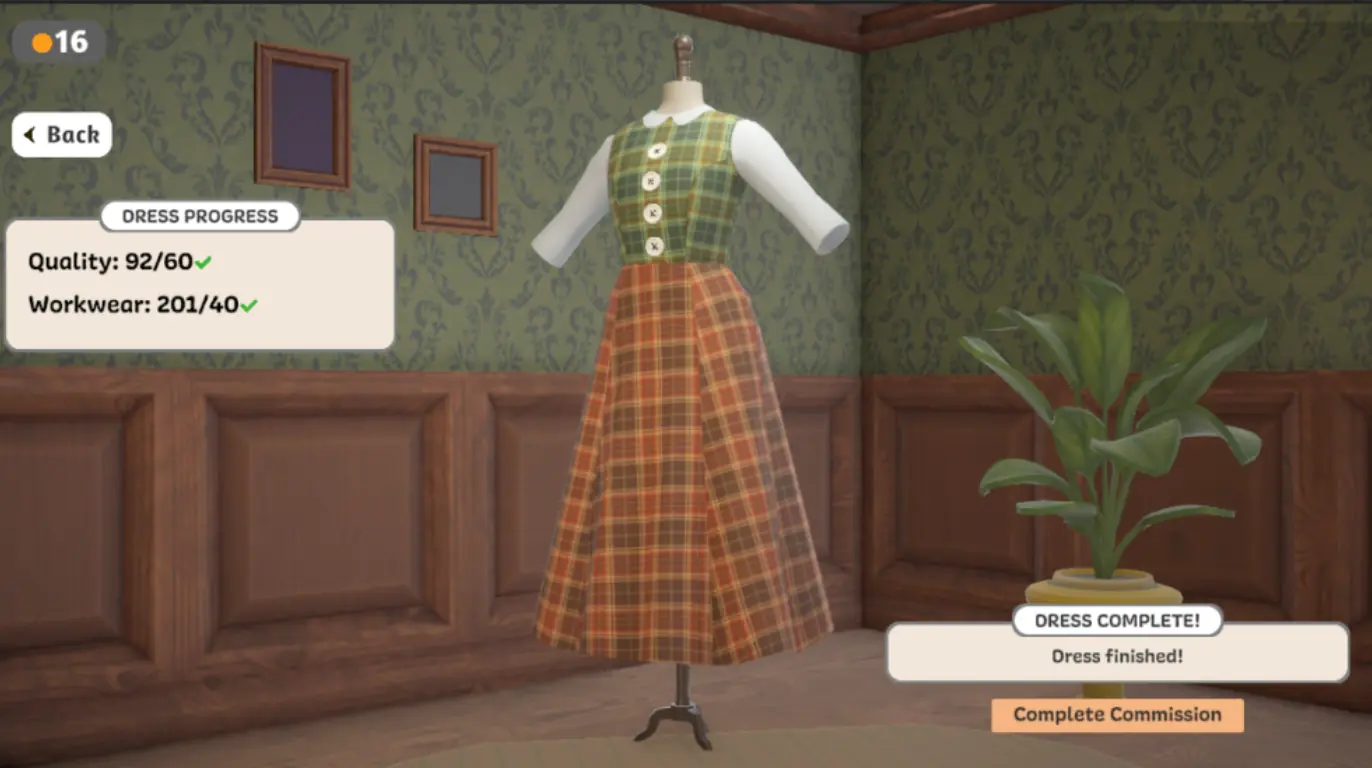
Follow the making steps →Compare each displayed value with its target. A finished dress can still miss the customer's requested result.
Compare real result screens →Try these small experiments in the browser prototype. Each image is a real game capture; the ideas use only what the pictured screens show.
In the sketchbook, compare two sleeve or skirt choices with the same fabric. Watch the silhouette and visible style tags before you draft.
Try the silhouette challenge →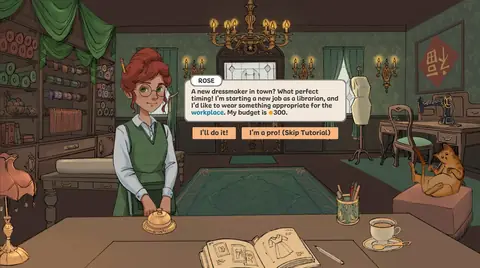
Her first request gives you a workplace occasion and a 300-coin budget. Choose a look, then compare the finished result with the displayed targets.
Try the commission challenge →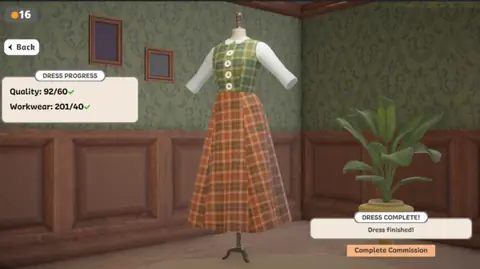
A finished garment can still miss a target. Compare Quality and Workwear with the numbers after each slash, then choose one thing to change next time.
Try the result challenge →繌い物ゲームには複数の楽し方があります。プレイしたい方法に合うものを選びてください。
デスクトップ版をインストールせず、このページ内の Dressmaker プロトタイプを起動できます。第三者のミラーなので、デスクトップ用ブラウザ、マウス、およびゲームファイルの読み込み時間が必要です。
ブラウザ版をプレイ開発者の itch.io ページにはデスクトップ版プロトタイプがあります。現在のファイルと対応システムを確認してください。
開発者の itch.io ページを開く商用完全版は Steam で入手できます。対応状況、プラットフォーム、言語、価格は公式ページで確認してください。
Steam で Dressmaker を見るどのバージョン? ブラウザー版・配布版・Steam版を比較。ハードウェアのスペックが必要ですか? エディション別の要件を比較。読み込みで困っていますか? トラブルシューティングガイドを開く。
Real screenshots from the official Steam release. These show the complete game, which is separate from the browser prototype playable above.
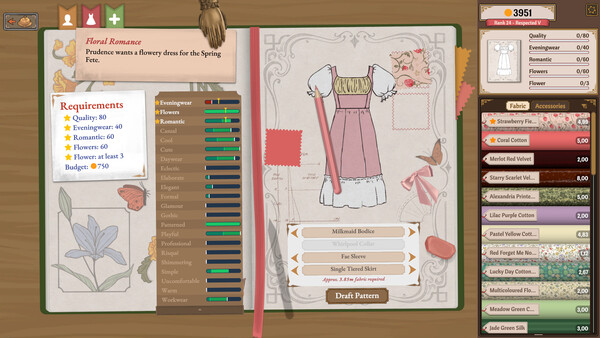
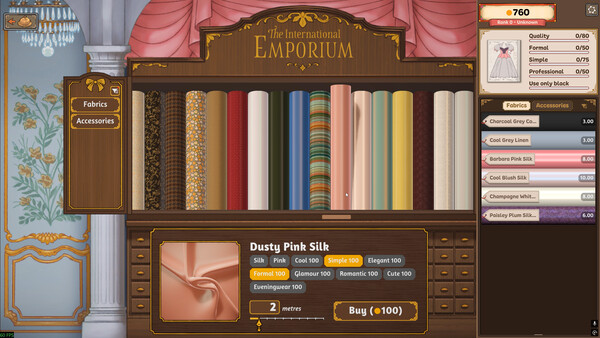
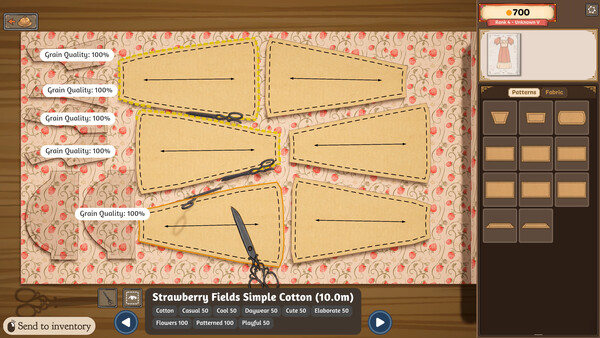
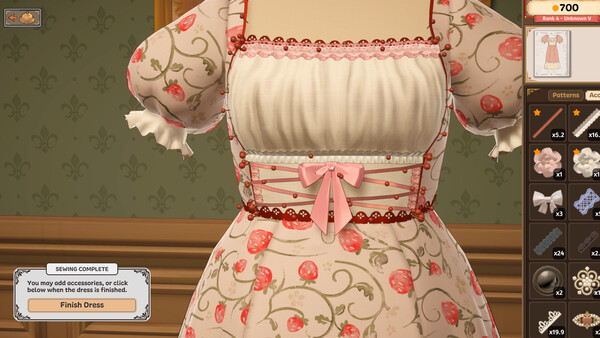
Images: official Dressmaker Steam store, © Cozy Lives / Free Lives. View the edition comparison before applying these screens to the browser prototype.
Follow real in-game screenshots through the first commission, sketchbook, sewing, target checks and design ideas. Then compare editions or create your own dress.
Browse all 12 Dressmaker guides →
Follow the real prototype screens from customer request through sketchbook to the finished dress.
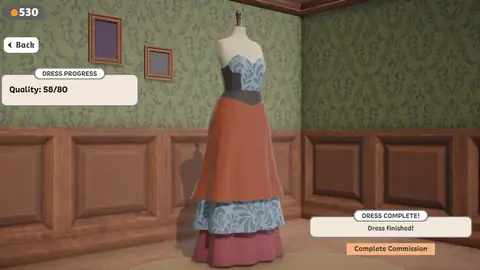
Check pattern placement, sewing prompts and displayed results without guessing hidden scoring rules.
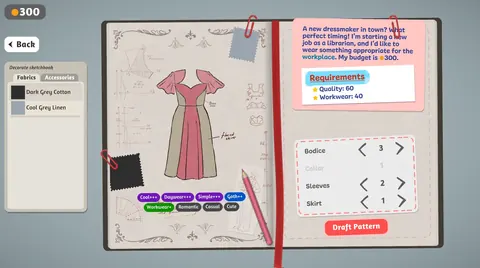
Turn a brief, budget and visible targets into concrete design and result checks.
Find the brief, change dress parts, compare fabrics and check visible style tags before drafting.
Compare two real result screens and distinguish a finished dress from a met target.
Try workwear, contrast panels and occasion details with examples from game screenshots.
Build 443 changed camera movement, cutting-room actions, trim placement and how some colour and fabric requirements are calculated. Check the affected tasks → This update guide is separate from the browser prototype above and cites the developers' notes.
Dressmaker は仕立てを静かで触感あふれる儀式に変えます。注文ひとつひとつが小さな物語——入ってくる客、選ぶ生地、手の中で育つドレス。
Rose は新しい図書館員の仕事に合うドレスを求めています。依頼と予算、画面に表示された品質と Workwear の目標を確認してからデザインを選びましょう。

スケッチブックがドレスを現実にします。基本の型を選び、合う生地を選び、ボディス・袖・スカートを調整してシルエットを思い描いた通りに近づけます。大胆なプリントも試してみてください——お客さんを驚かせられます。

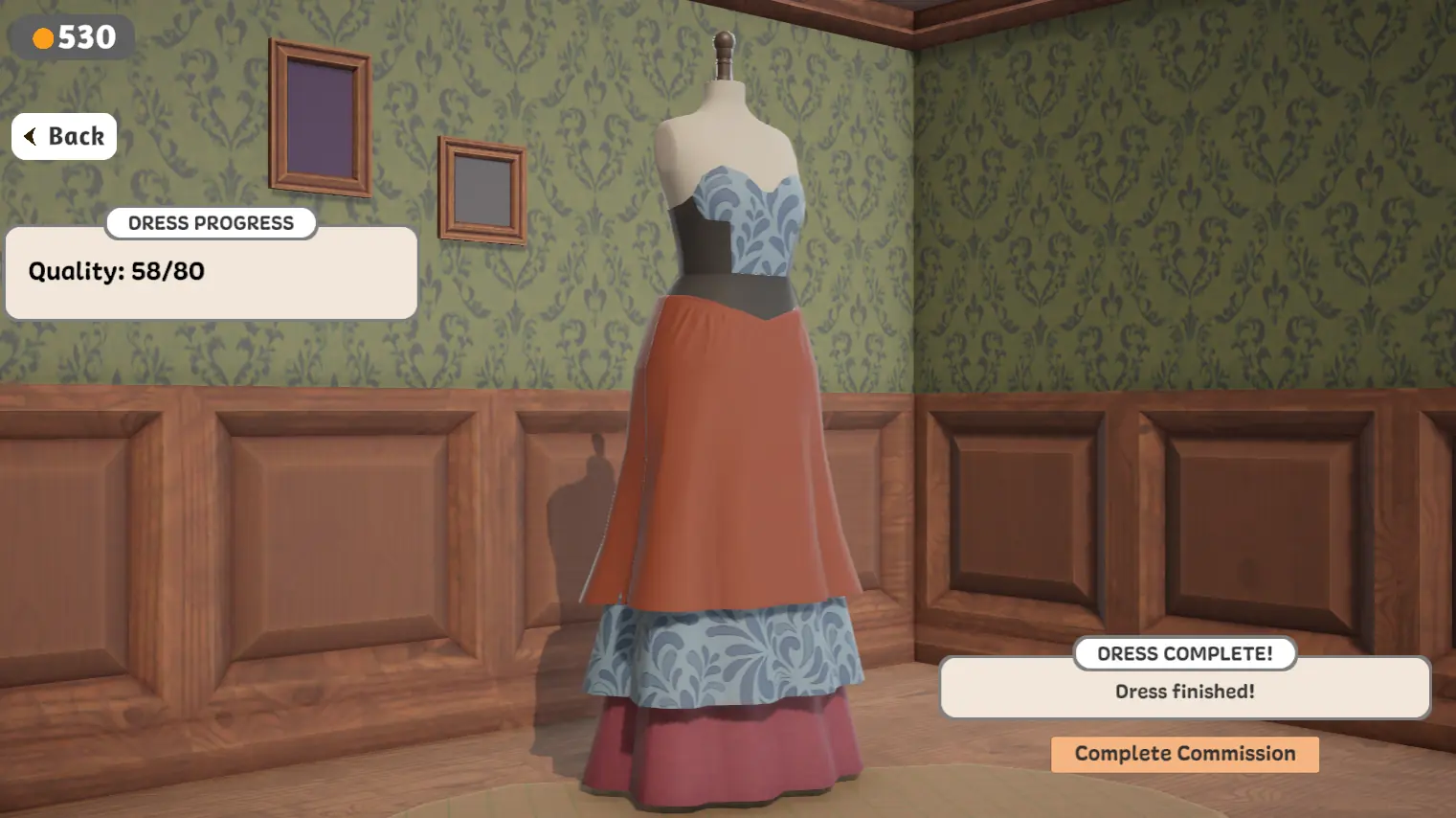
完成したドレスは進捗表示とともにマネキンに現れます。この画像では品質と Workwear の値が目標と並んでいます。注文を完了する前に両方を確認しましょう。

Four real browser prototype screens: Rose's brief, the sketchbook, and two different finished-dress results.


最初の注文を妨げる6つの問題と、それぞれの対処法。以下の回答はすべて、このページのブラウザ版プロトタイプの画面から読み取ったものです。
The game canvas sits inside an iframe, so it only takes mouse and keyboard events after you click into it once. Click inside the frame to give it focus, then try again.
Use a mouse for dragging and cutting. A touch screen or trackpad makes precision steps much harder.
Full loading and input checklist →Finishing the garment and meeting the customer's target are two separate steps. Dress Progress shows each value against its own target, and a green check appears only when that one line is satisfied.
A finished dress can sit below its quality target and still offer a Complete Commission button. That is a result, not a bug.
See both outcomes side by side →Bodice 3 means the third bodice variant, not a score of three. The numbers next to each row tell you which option you are on. The number of plus signs on the style tags below the drawing is the useful signal.
Three pluses means the game reads that quality strongly in the current design. One plus means it is present but weak.
Read the sketchbook screen →Watch the tag that matches the occasion, not the loudest one. For a workplace commission the Workwear tag is the line to track, and a quiet colour lets the silhouette carry the look while a loud print pulls the tags elsewhere.
Style tags respond to what is on the dress. Quality responds to how the garment was made, so a design can pass one and fail the other.
Turn a brief into visible checks →A page that never leaves the loading state is almost always a blocked request rather than a slow one. Open the developer console and look for failed requests to the game host, then try the hosted game directly in a new tab to find out which side is failing.
A privacy extension, an ad blocker or a network filter will block those files silently. No amount of waiting helps.
Diagnose a blank player →The player on this page is a third-party hosted prototype. The creators' downloadable prototype and the complete Steam release are separate products with more customers, fabrics and decoration tools.
The complete release also changed how some requirements are calculated, so an older dress can show a different value after an update.
Compare the three editions →以下の数字は完全版の Steam 版についてのものです。上で遊べるプロトタイプとは別の製品です。すべて出所の公式ページへリンクしているので、ご自身でご確認いただけます。
99% positive
Overwhelmingly Positive across 13,985 English-language reviews.
Steam store page ↗ブラウザでの遊び方、マウス操作、ダウンロード、モバイル対応、製作者、公式配信元について。
Dressmaker は実際の縫製から着想を得た、ゆったりしたクラフトシミュレーションです。生地を選び、型紙を配置して裁ち、服を縫い、町の人々のための特別注文を仕上げます。
この独立系ファンポータルは、デスクトップ版をインストールせずに起動できる、ブラウザホスティング版の試作版を埋め込んでいます。第三者によるミラーであり、制作者のダウンロード版や Steam 完全版とは別のものです。各版を比較する。
マウスとキーボードです。クリックで生地や道具を持ち、ドラッグで型紙を配置し、ミシンをクリックして縫い付けます。ゲームパッド対応はまだありません。精密な生地の作業にはマウスが本当に必要です。
iOS 版や Android 版は公開されていません。この埋め込み版はデスクトップブラウザ向けです。
プレイ可能な試作版は Ruan Rothmann、Sara Laubscher、Sabrina Becker、Jonathan Hau-Yoon をクレジットし、音楽は Meydan です。
埋め込みのブラウザプレイヤーは第三者がホストしています。ゲームファイルは Play を押した後に読み込まれ、読み込み時間は回線・ブラウザ・ゲームホストの状態によって変わります。空白のままなら、新しいデスクトップブラウザを試すか、ページを再読み込みするか、読み込みチェックリストに従うか、制作者の itch.io ダウンロードを使ってください。


