Read the commission
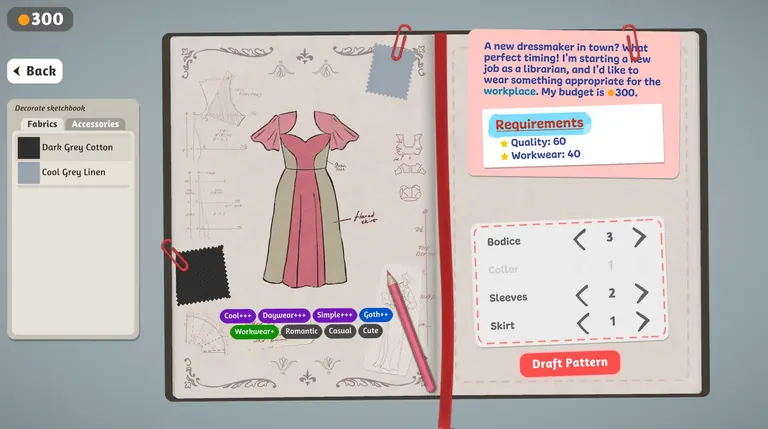
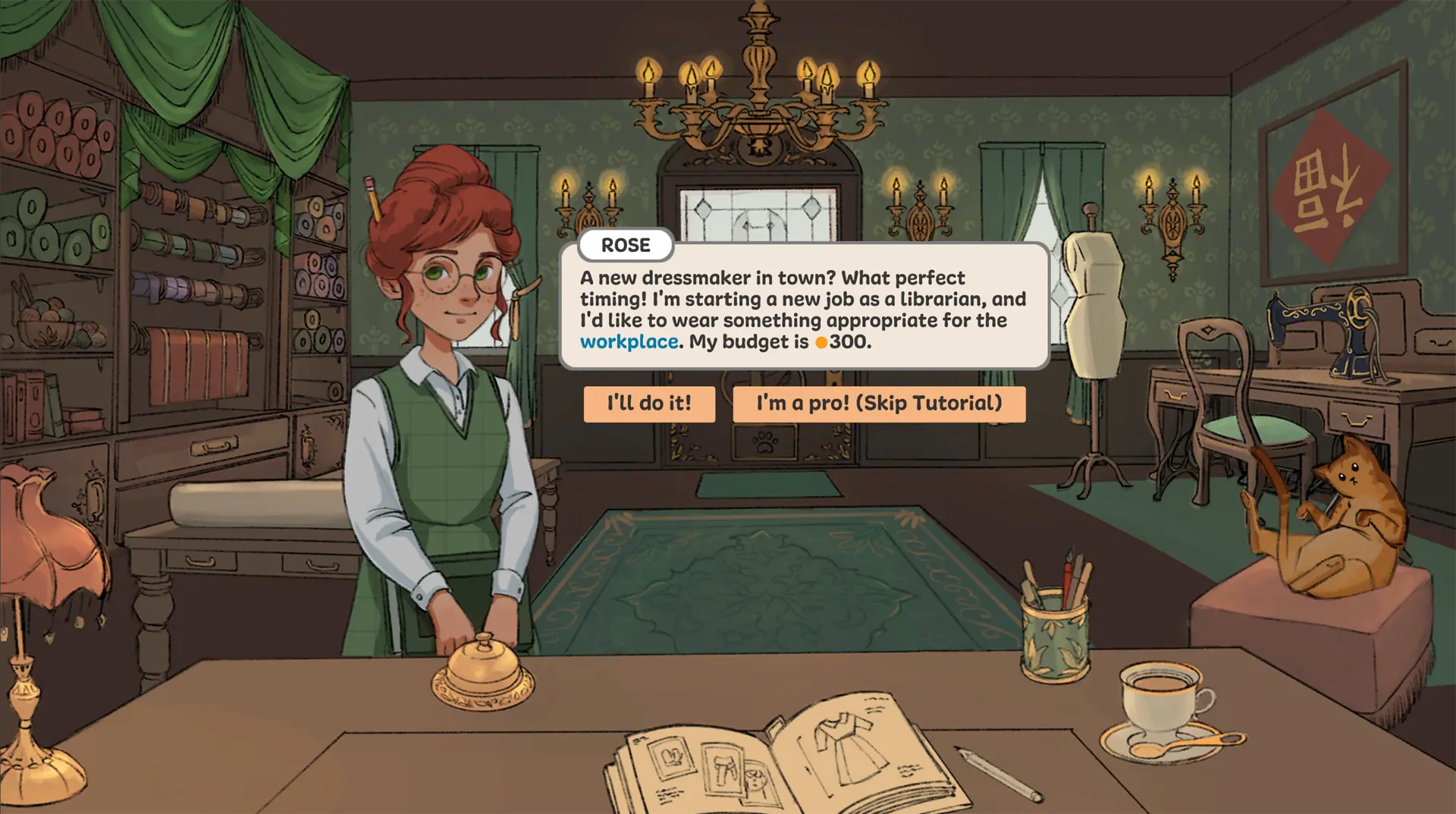
Rose asks for librarian workwear on a 300-coin budget. Note the occasion and the targets before choosing a dress.
See Rose's brief and screenshot →Play Dressmaker Online
No install · game files load after you press Play
Loading Dressmaker...
No install · game files load after you press Play
Connecting...
Taking longer? Open the loading guideFor the best experience on mobile, turn your phone sideways and use landscape mode.
If the game stays blank, reload it or follow the loading checklist. Reloading may reset your progress.
Play the free browser prototype. Start with Rose's workwear commission, choose a design in the sketchbook, cut and sew, then check your result.
 Screenshot from the Dressmaker prototypePlay Dressmaker ↗
Start with the browser prototype above. These four steps follow what you can see in the game; our beginner guide has real screenshots and more detail.
Rose asks for librarian workwear on a 300-coin budget. Note the occasion and the targets before choosing a dress.
See Rose's brief and screenshot →Change one bodice, sleeve or skirt part at a time. Compare fabrics and the visible style tags before drafting.
Explore the sketchbook controls →When the design is ready, select Draft Pattern. Follow the game's prompts for fabric placement and sewing.
Follow the making steps →Compare each displayed value with its target. A finished dress can still miss the customer's requested result.
Compare real result screens →Try these small experiments in the browser prototype. Each image is a real game capture; the ideas use only what the pictured screens show.
In the sketchbook, compare two sleeve or skirt choices with the same fabric. Watch the silhouette and visible style tags before you draft.
Try the silhouette challenge →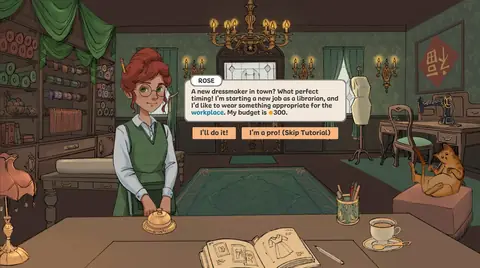
Her first request gives you a workplace occasion and a 300-coin budget. Choose a look, then compare the finished result with the displayed targets.
Try the commission challenge →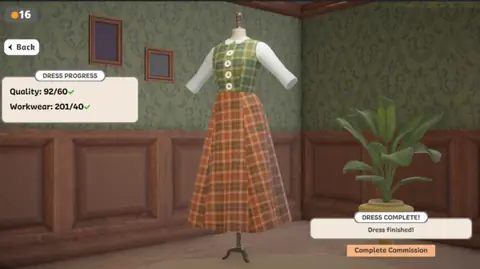
A finished garment can still miss a target. Compare Quality and Workwear with the numbers after each slash, then choose one thing to change next time.
Try the result challenge →There are separate ways to try the sewing game. Choose the one that matches how you want to play.
Start the embedded Dressmaker prototype on this page without installing a desktop build. It is a third-party browser mirror and needs a desktop browser, a mouse, and time to load its game files.
Play the browser versionThe creators’ itch.io page offers the desktop prototype. Check its listing for the current files and supported systems.
Open the creators’ itch.io pageThe complete commercial edition is listed on Steam. Check the official store page for current availability, supported platforms, languages, and price.
View Dressmaker on SteamUnsure which version is here? Compare browser, download and Steam release. Need hardware details? Compare requirements by edition. Having trouble loading? Open the troubleshooting guide.
Real screenshots from the official Steam release. These show the complete game, which is separate from the browser prototype playable above.
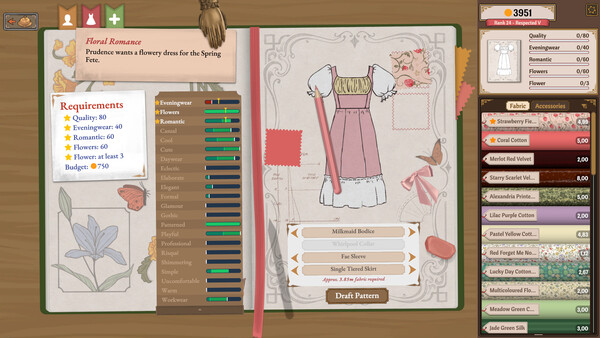
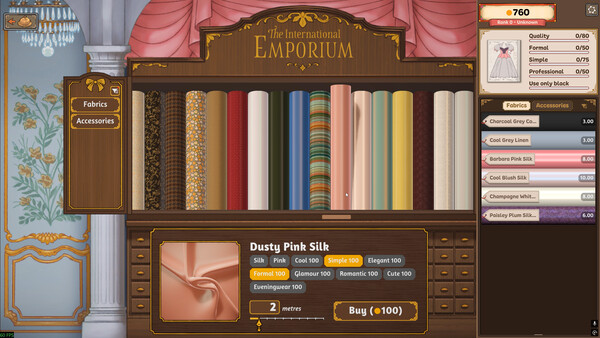
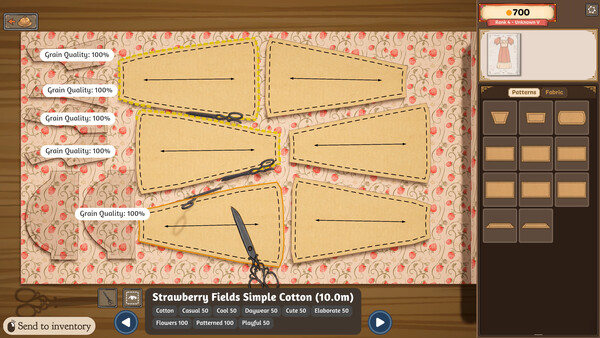
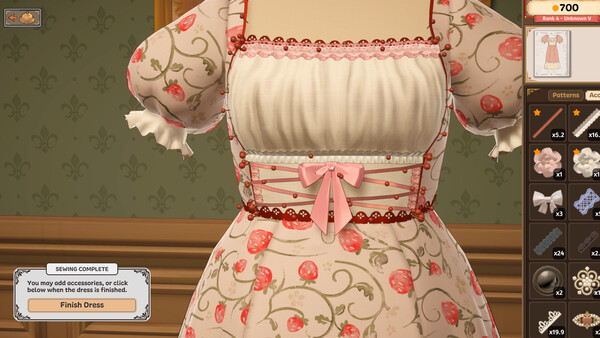
Images: official Dressmaker Steam store, © Cozy Lives / Free Lives. View the edition comparison before applying these screens to the browser prototype.
Follow real in-game screenshots through the first commission, sketchbook, sewing, target checks and design ideas. Then compare editions or create your own dress.
Browse all 12 Dressmaker guides →
Follow the real prototype screens from customer request through sketchbook to the finished dress.
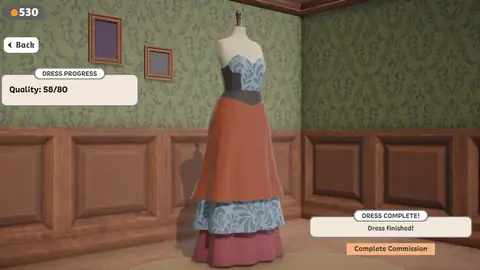
Check pattern placement, sewing prompts and displayed results without guessing hidden scoring rules.
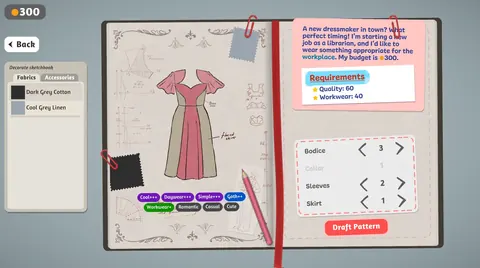
Turn a brief, budget and visible targets into concrete design and result checks.
Find the brief, change dress parts, compare fabrics and check visible style tags before drafting.
Compare two real result screens and distinguish a finished dress from a met target.
Try workwear, contrast panels and occasion details with examples from game screenshots.
Build 443 changed camera movement, cutting-room actions, trim placement and how some colour and fabric requirements are calculated. Check the affected tasks → This update guide is separate from the browser prototype above and cites the developers' notes.
Dressmaker turns garment-making into a calm, tactile ritual. Every commission is a small story — the customer who walks in, the fabric you pick, the dress that grows under your hands.
Rose wants a dress suited to her new librarian job. Read her brief, note the budget and the visible Quality and Workwear targets, then use those details to guide your choices.
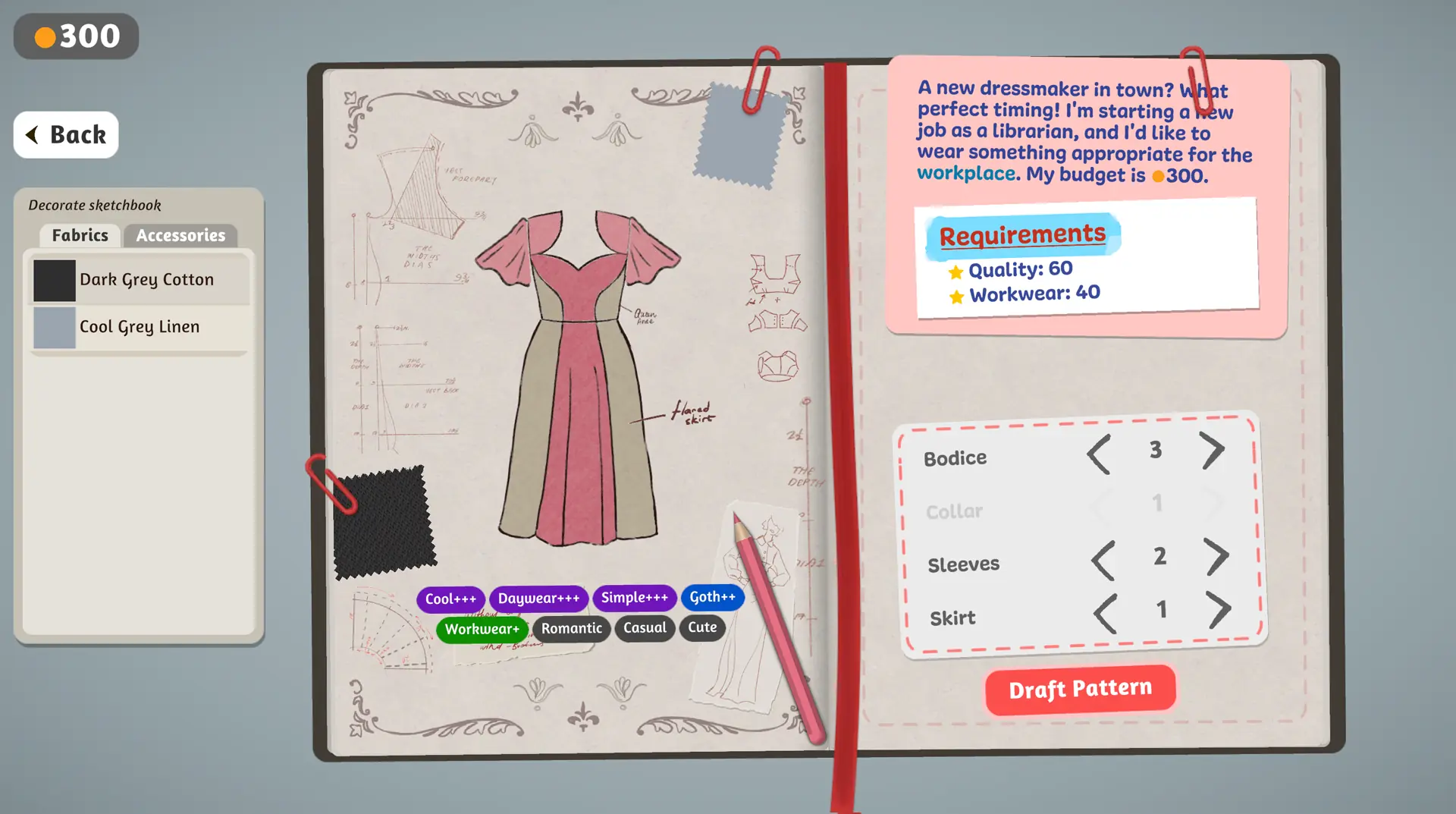
The sketchbook is where the dress becomes real. Pick a base pattern, choose fabrics that feel right together, and adjust the bodice, sleeves and skirt until the silhouette matches what you imagined. Try a louder print or an unexpected combination — the customers often surprise you.
The finished dress appears on the mannequin beside Dress Progress. In this pictured order, the panel shows Quality and Workwear against their targets. Check each value before you complete the commission.
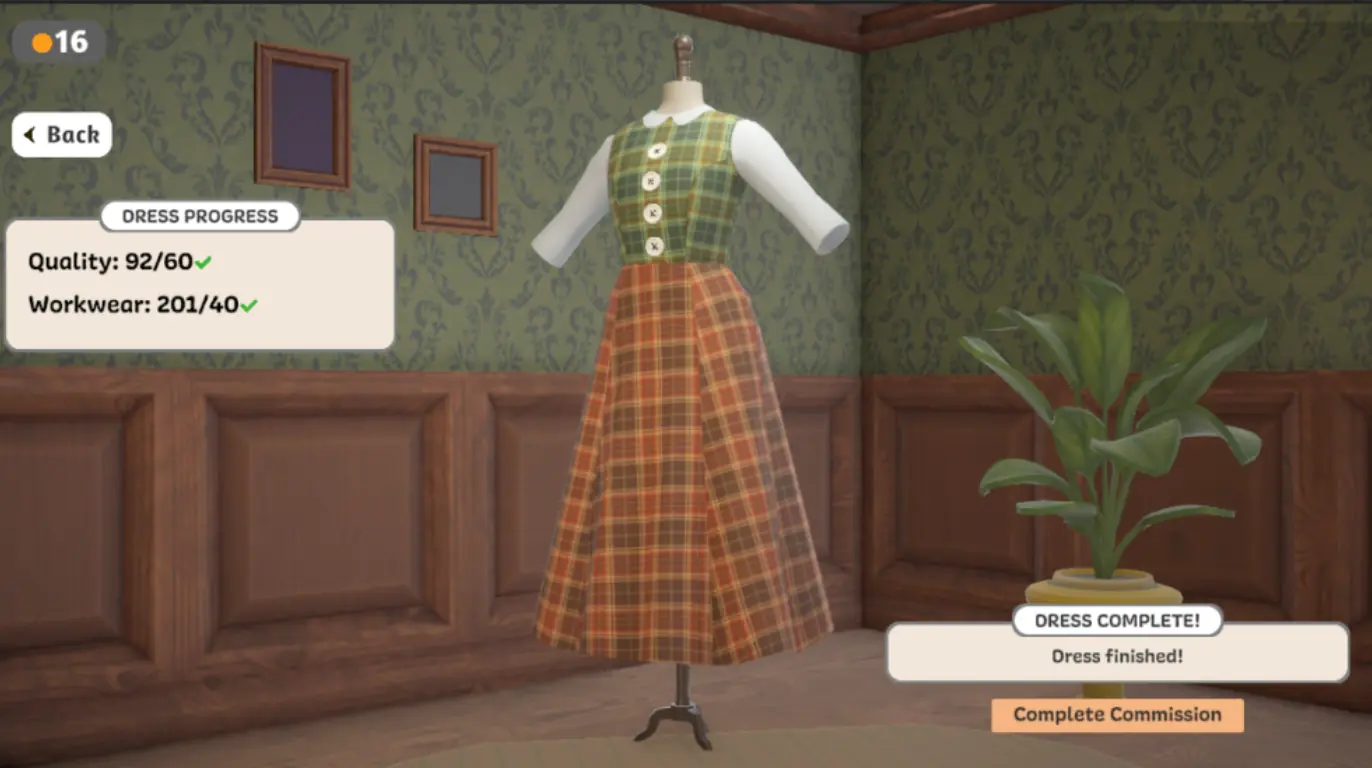
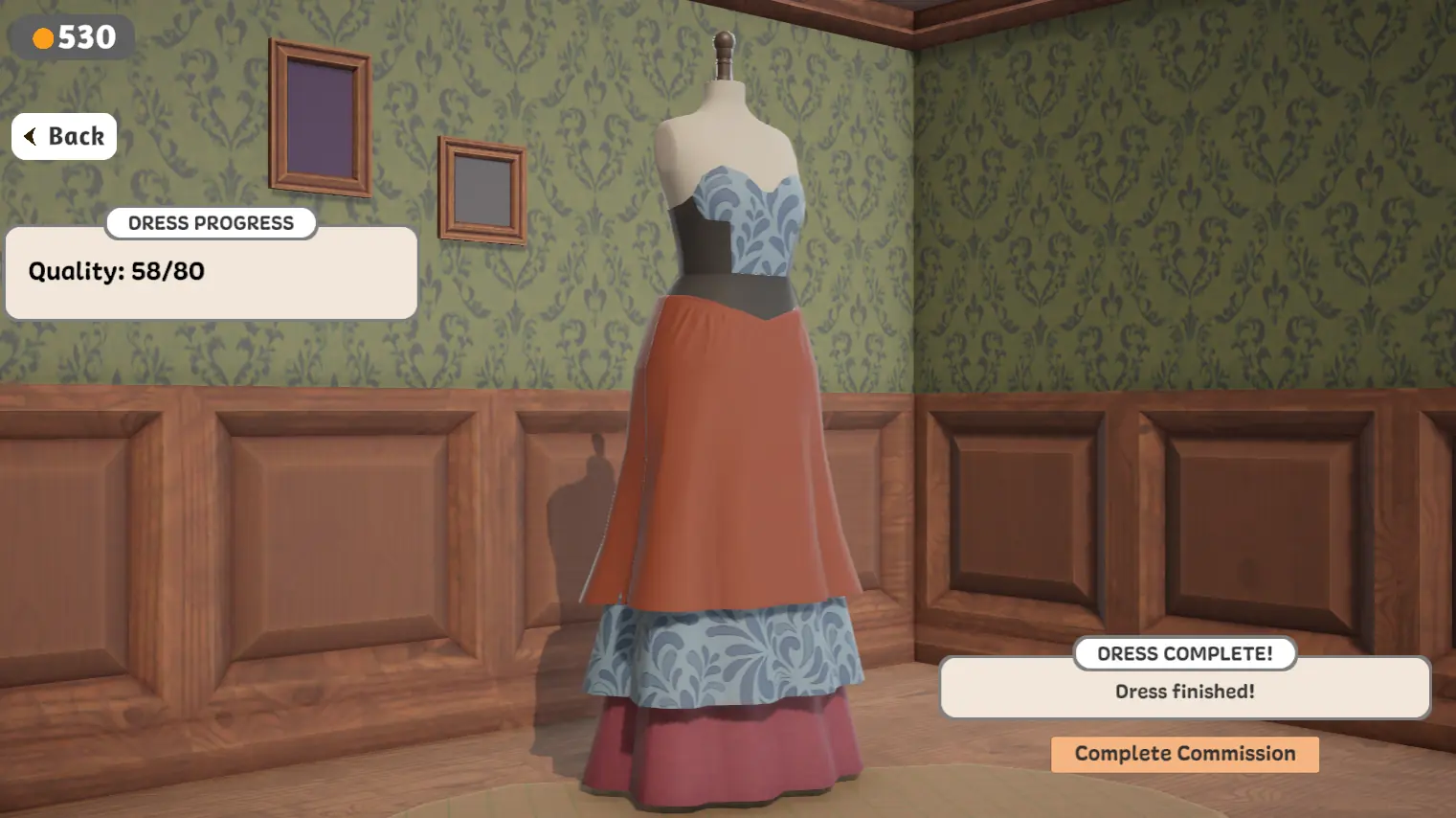
Four real browser prototype screens: Rose's brief, the sketchbook, and two different finished-dress results.





Six things that stop a first commission, and what to do about each one. Every answer below comes from a screen in the browser prototype on this page.
The game canvas sits inside an iframe, so it only takes mouse and keyboard events after you click into it once. Click inside the frame to give it focus, then try again.
Use a mouse for dragging and cutting. A touch screen or trackpad makes precision steps much harder.
Full loading and input checklist →Finishing the garment and meeting the customer's target are two separate steps. Dress Progress shows each value against its own target, and a green check appears only when that one line is satisfied.
A finished dress can sit below its quality target and still offer a Complete Commission button. That is a result, not a bug.
See both outcomes side by side →Bodice 3 means the third bodice variant, not a score of three. The numbers next to each row tell you which option you are on. The number of plus signs on the style tags below the drawing is the useful signal.
Three pluses means the game reads that quality strongly in the current design. One plus means it is present but weak.
Read the sketchbook screen →Watch the tag that matches the occasion, not the loudest one. For a workplace commission the Workwear tag is the line to track, and a quiet colour lets the silhouette carry the look while a loud print pulls the tags elsewhere.
Style tags respond to what is on the dress. Quality responds to how the garment was made, so a design can pass one and fail the other.
Turn a brief into visible checks →A page that never leaves the loading state is almost always a blocked request rather than a slow one. Open the developer console and look for failed requests to the game host, then try the hosted game directly in a new tab to find out which side is failing.
A privacy extension, an ad blocker or a network filter will block those files silently. No amount of waiting helps.
Diagnose a blank player →The player on this page is a third-party hosted prototype. The creators' downloadable prototype and the complete Steam release are separate products with more customers, fabrics and decoration tools.
The complete release also changed how some requirements are calculated, so an older dress can show a different value after an update.
Compare the three editions →These figures describe the complete Steam release, which is a separate product from the prototype playable above. Each one links to the official page it was read from, so you can check it yourself.
99% positive
Overwhelmingly Positive across 13,985 English-language reviews.
Steam store page ↗Browser play, mouse controls, desktop downloads, mobile support, creators, and official releases.
Dressmaker is a cozy crafting simulation inspired by real dressmaking. You choose fabrics, arrange and cut pattern pieces, sew garments, and complete custom-dress commissions for townsfolk.
This independent fan portal embeds a browser-hosted prototype that you can start without installing a desktop build. It is a third-party mirror, separate from the creators’ downloadable prototype and the complete Steam release. Compare the editions.
Mouse and keyboard. Click to pick up fabric and tools, drag to position pattern pieces, and click the sewing machine to stitch. There is no gamepad support yet — the precision fabric work really wants a mouse.
No native iOS or Android edition is listed. This embedded prototype is intended for desktop browsers.
The playable prototype credits Ruan Rothmann, Sara Laubscher, Sabrina Becker, and Jonathan Hau-Yoon, with music by Meydan.
The embedded browser player is hosted by a third party. Its game files load after you press Play, and loading time depends on your connection, browser and the game host. If it stays blank, try a current desktop browser, refresh the page, follow our loading checklist, or use the creators’ itch.io download.