Sewing and Quality in Dressmaker
A good result starts before the sewing machine. The official game description ties fabric layout, cutting and seams to the garment you see at the end. Use this checklist to keep each stage deliberate.
Before you cut: inspect the layout
The official Steam description says grain alignment and the way you arrange pattern pieces affect the finished garment. In whichever edition you play, pause when the pattern is laid on fabric and check:
- Are all pieces present and inside the material you intend to use?
- Does the grain or print direction match your design idea?
- Will adjacent panels look intentional when placed together?
- Have you looked at the mannequin preview, if your build offers one?
This is the stage where the biggest visual mistakes are cheapest to fix. A panel rotated ninety degrees looks wrong immediately on the mannequin and is very hard to correct after the pieces are cut and sewn. For more detail on fabric direction and patterns, read the fabric and pattern guide.
At the machine: follow the prompt you can see
The official store describes feeding fabric through a sewing machine to stitch it together. The prototype's on-screen tutorial is the best source for its particular controls. Make small, controlled movements and slow down around changes in direction. If an input does not respond, click inside the game frame to give it focus and use a mouse on a desktop display.
Speed is not the goal here. Rushing a seam tends to produce a worse result than the one you would have got by moving slowly, and it removes the chance to correct a small drift before it becomes a large one. If you lose track of the seam, re-read the on-screen prompt rather than guessing what the next step is.
Do not assume that a technique described for the complete release maps exactly to Prototype 0.5.5. The versions are separate; our edition comparison explains where each one is available.
After sewing: read the visible result
The two screenshots below show finished garments, and the difference between them is the whole point of this guide. The layered dress on the left is complete — the panel says Dress finished! and offers a Complete Commission button — but its quality value reads 58/80 with no check mark. The plaid workwear dress on the right shows Quality: 92/60 and Workwear: 201/40, each with a green check.
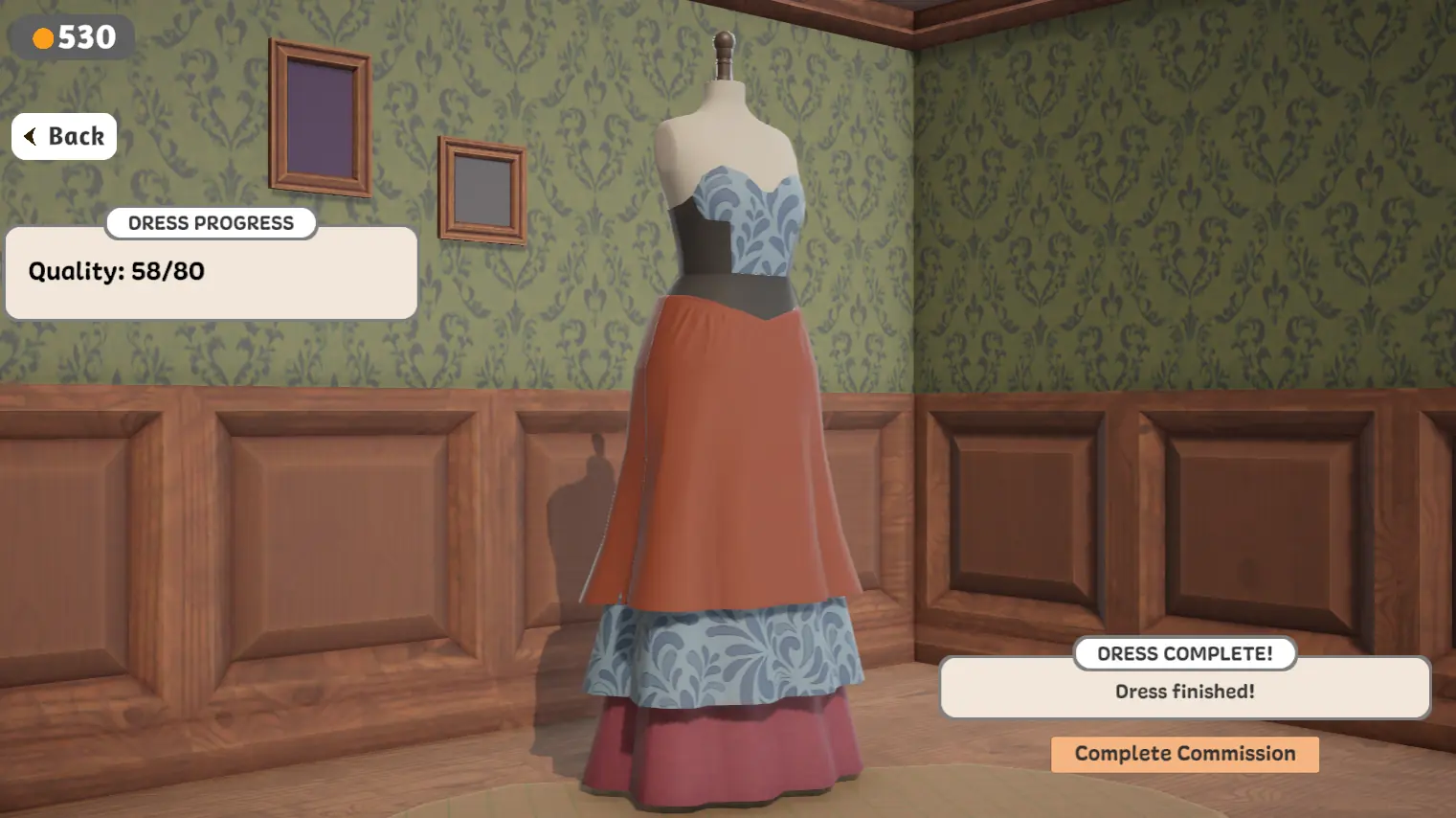
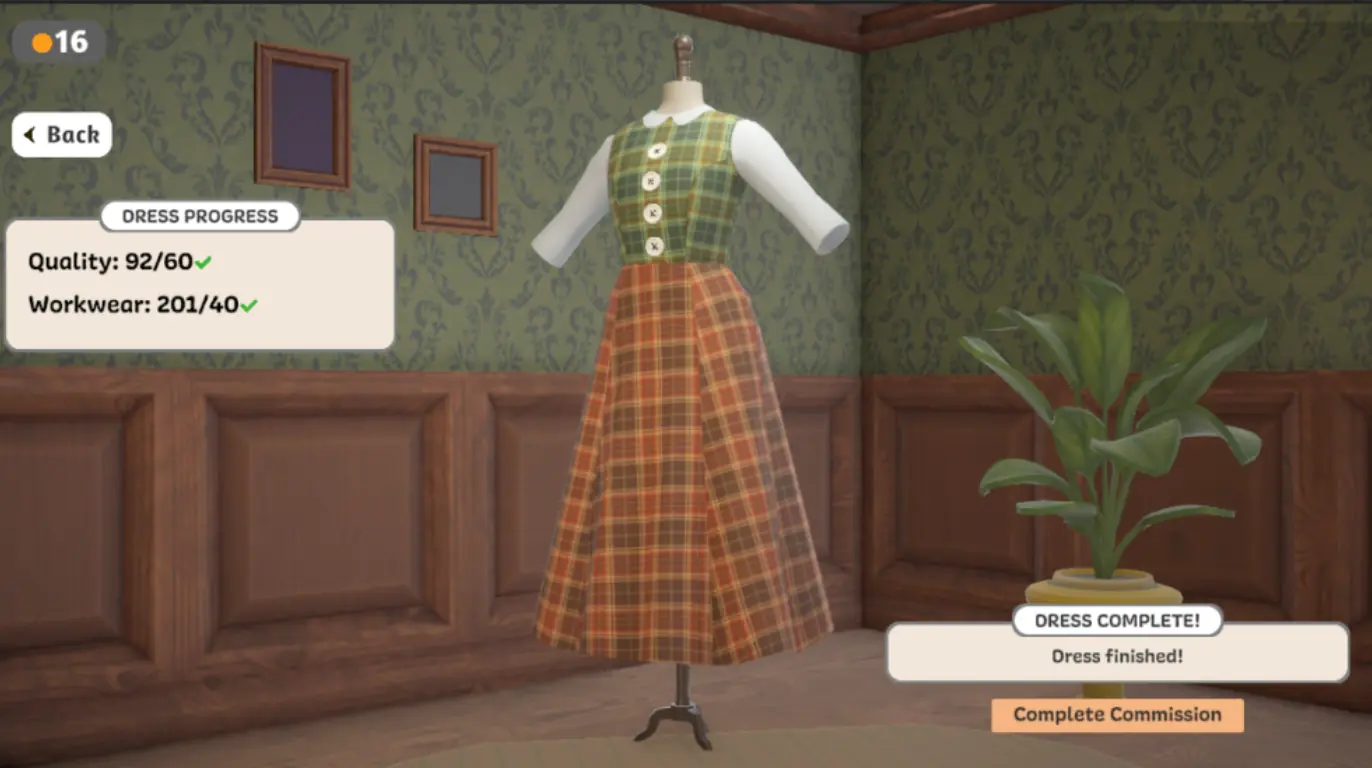
Separate the result into two questions: did the garment meet the visible quality target, and did it meet the customer's style request? A dress can look attractive while missing a brief, or satisfy a style target while leaving room to improve its making. Compare each displayed value with the target on the same commission screen.
Also separate what the panel shows from what it does not. It reports the values the game computed for that dress. It does not show how the score was calculated, it does not tell you which single action was worth the most points, and it does not show the customer's reaction after you complete the commission. Anyone who claims to know the scoring formula for every build is guessing.
A repeatable improvement loop
Improving is mostly a matter of making your next attempt comparable to the last one. If you change fabric, silhouette and finishing all at once, you cannot tell which change helped — and if the result gets worse, you cannot tell which one to undo.
- Write down the visible target before starting.
- Make the dress and note the final displayed values.
- On the next attempt, change one thing: layout, fabric choice, or how carefully you follow the sewing prompt.
- Compare the new result with the previous one. Keep the choice that better serves the customer brief.
- Repeat with the next single change until you know which moves actually pay off for you.
This is a learning method, not a guarantee of a perfect score. We do not publish unverified hidden formulas or promise that one design reaches 100% in every build. Our commission checker is a convenient place to record those numbers; it stores your notes on your own device and never reads the game.
Frequently asked questions
Does “Dress finished!” mean my quality target was met?
No. That message only confirms the making step is complete. Check the Dress Progress panel: the check mark next to a line is what tells you that displayed value reached its target. The quality targets guide compares a passing and a failing example.
Is there a way to reach a guaranteed 100% quality score?
We do not publish one, because no documented formula exists that we can verify. What does work is the single-change loop above: record the targets, make the dress, change one decision at a time and compare the displayed results.
Should I choose the most expensive fabric to raise my score?
There is no verified link between fabric price and a quality value. More useful is to make sure the fabric suits the customer's request, since the style target and the quality target are scored and displayed separately.
Does the prototype score the same way as the Steam release?
Do not assume so. The editions are separate builds with different content and, in the creators' own update notes, different internal calculations. Treat any figure you see as belonging to the build you played.
Last updated: 24 October 2026